
Releasing the trunk lid
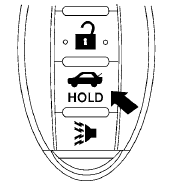
Press the  button for longer than
0.5 seconds
to open the trunk lid. The trunk release
button will not operate when the ignition switch is
in the ON position or when the trunk cancel
switch is in the OFF position. See “Cancel
switch” in this section.
button for longer than
0.5 seconds
to open the trunk lid. The trunk release
button will not operate when the ignition switch is
in the ON position or when the trunk cancel
switch is in the OFF position. See “Cancel
switch” in this section.
See also:
2009 Nissan Rogue
Car names are fun to play with. Take the 2009 Nissan Rogue, for example. The
Rogue doesn't play by the rules; It colors outside the lines and lives outside
the box. I could go on and on. In this c ...
Tire Pressure Monitoring System (TPMS)
This vehicle is equipped with the Tire Pressure
Monitoring System (TPMS). It monitors tire
pressure of all tires except the spare. When
the low tire pressure warning light is lit and the
CHECK ...
Bluetooth Hands-Free Phone System with
Navigation System (if so equipped)
WARNING
● Use a phone after stopping your vehicle
in a safe location. If you have to use a
phone while driving, exercise extreme
caution at all times so full attention may
be given to vehic ...