
Loose Fuel Cap warning
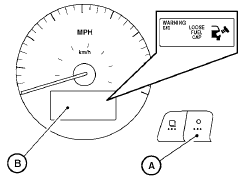
The LOOSE FUEL CAP warning appears in the vehicle information display when the fuel-filler cap is not tightened correctly after the vehicle has been refueled. It may take a few driving trips for the message to be displayed. To turn off the warning, perform the following:
1. Remove and install the fuel-filler cap as soon as possible. See “Fuel-filler cap”.
2. Tighten the fuel-filler cap until it clicks.
3. Press the  next button A on
the instrument
panel located behind the steering
wheel for about 1 second to turn off the
LOOSE FUEL CAP warning B after tightening
the fuel-filler cap.
next button A on
the instrument
panel located behind the steering
wheel for about 1 second to turn off the
LOOSE FUEL CAP warning B after tightening
the fuel-filler cap.
See also:
How to use the SETTING button
When the SETTING button is pressed, the Settings
screen will appear on the display. You can
select and/or adjust several functions, features
and modes that are available for your vehicle. Use ...
Bluetooth Hands-Free Phone System with
Navigation System (if so equipped)
WARNING
● Use a phone after stopping your vehicle
in a safe location. If you have to use a
phone while driving, exercise extreme
caution at all times so full attention may
be given to vehic ...
Sun visors
Coupe shown, sedan similar
1 To block glare from the front, swing down the
main sun visor.
2 To block glare from the side, remove the sun
visor from the center mount and swing the
sun visor to ...