
Backing up behind a projecting object
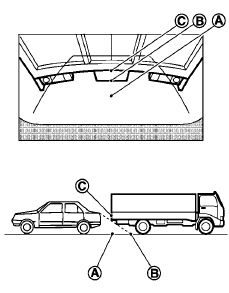
The position C is shown farther than the position B in the display. However, the position C is actually at the same distance as the position A . The vehicle may hit the object when backing up to the position A if the object projects over the actual backing up course.
See also:
Audio main operation
POWER/VOLUME control:
Place the ignition switch in the ACC or ON
position. Press the PWR button while the system
is off to call up the mode (radio, CD or AUX) that
was playing immediately befor ...
How to use the STATUS button
To display the status of the audio, climate control
system and fuel consumption, press the STATUS
button.
The following information will appear when the
STATUS button is pressed multiple times: ...
Compact disc (CD) player operation
Place the ignition in the ACC or ON position and
insert the compact disc into the slot with the label
side facing up. The compact disc will be guided
automatically into the slot and start playin ...