
List of voice commands
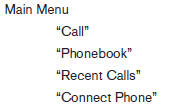
When you press and release the  button on
the steering wheel, you can choose from the
commands on the Main Menu. The following
pages describe these commands and the commands
in each sub-menu.
button on
the steering wheel, you can choose from the
commands on the Main Menu. The following
pages describe these commands and the commands
in each sub-menu.
Remember to wait for the tone before speaking.
After the main menu, you can say “Help” to hear the list of commands currently available any time the system is waiting for a response.
If you want to end an action without completing it, you can say “Cancel” or “Quit” at any time the system is waiting for a response. The system will end the VR session. Whenever the VR session is cancelled, a double beep is played to indicate you have exited the system.
If you want to go back to the previous command, you can say “Go back” or “Correction” any time the system is waiting for a response.
See also:
Continuously Variable Transmission (CVT) fluid
CAUTION:
- Use only Genuine NISSAN CVT Fluid
NS-2. Do not mix with other fluids.
- Using transmission fluid other than
Genuine NISSAN CVT Fluid NS-2 will
damage the CVT, which is not covered
...
Injured persons
NISSAN recommends that injured persons use
seat belts. Check with your doctor for specific
recommendations. ...
Using the interior light
Press the
button on the keyfob once to
turn on the interior lights.
For additional information, refer to “Interior light”
in the “Instruments and controls” section in this
manual. ...