
“Recent Calls”
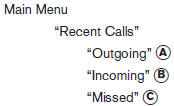
Use the Recent Calls command to access outgoing, incoming or missed calls.
“Outgoing” A
Use the Outgoing command to list the outgoing calls made from the vehicle.
“Incoming” B
Use the Incoming command to list the incoming calls made to the vehicle.
“Missed” C
Use the Missed command to list the calls made to the vehicle that were not answered.
See also:
Under the Hood
The Pathfinder's 4.0-liter V-6 produces 270 horsepower and 291 pounds-feet of
torque. Operating with electronic throttle control, the V-6 features Continuous
Valve Timing Control. All Pathfinders ...
Speedometer and odometer
Speedometer and odometer
Speedometer
The speedometer indicates the vehicle speed.
Odometer/Twin trip odometer
The odometer/twin trip odometer is displayed
when the ignition switch is placed ...
Manual shift mode (if so equipped)
When the shift selector is in the Ds (Drive Sport)
position, the transmission is ready for the manual
shift mode. Shift ranges can be selected manually
by moving the shift selector up (+) or down ...