
Troubleshooting guide
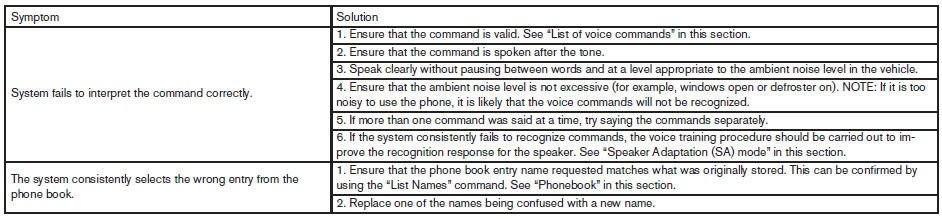
The system should respond correctly to all voice commands without difficulty. If problems are encountered, try the following solutions.
Where the solutions are listed by number, try each solution in turn, starting with number 1, until the problem is resolved.
See also:
Towing load/specification
*1: The towing capacity values are calculated
assuming a base vehicle with driver and any
options required to achieve the rating. Additional
passengers, cargo and/or optional equipment
will ...
Stowing the damaged tire and the tools
1. Securely store the damaged tire, jack and
tools in the storage area.
2. Replace the luggage floor box.
3. Replace the lids on the luggage side boxes.
4. Close the luggage floor board.
5. Repl ...
Emission control system warranty
Your NISSAN vehicle is covered by the following
emission warranties:
For USA
1. Emission Defects Warranty
2. Emissions Performance Warranty
Details of this warranty may be found with other
vehic ...