
Voice recognition settings
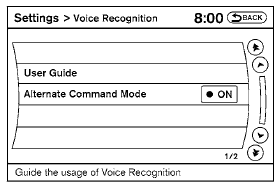
The available settings of the NISSAN Voice Recognition system are described.
1. Select “Voice Recognition”.
2. You can confirm the page by scrolling the screen.
See also:
Useful tips for correct operation
You can display useful speaking tips to help the
system recognize your voice commands correctly.
1. Select “Help on Speaking”.
2. You can confirm the page by scrolling the
screen. ...
Control panel buttons — color screen with navigation
system (if so equipped)
Control panel buttons — color screen with navigation
system (if so equipped)
1. (brightness control) button
2. Display screen
3. MAP button*
4. NAV button*
5. TRAF button*
6. SETUP bu ...
Turn signal/hazard indicator
lights
The appropriate light flashes when the turn signal
switch is activated.
Both lights flash when the hazard switch is turned
on. ...