
Alternate Command Mode command list
Nissan Altima / Nissan Altima Owners Manual / Monitor, climate, audio, phone and voice recognition systems / NISSAN Voice Recognition System
(if so equipped) / NISSAN Voice Recognition Alternate
Command Mode / Alternate Command Mode command list
Phone Command:

Navigation Command:
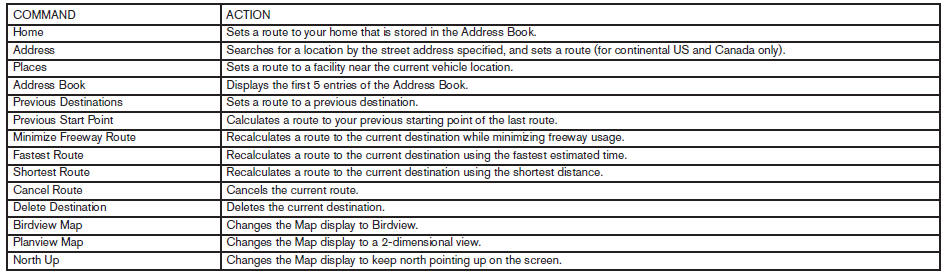

Information Command:

Audio Command:

See also:
Telescopic operation
Pull the lever 1 all the way toward you and
adjust the steering wheel forward or backward in
direction 3 , to the desired position. Lock the
wheel by releasing the lever and ensure that the
lever ...
Ignition switch
● Never remove or turn the key to the
LOCK position while driving. The steering
wheel will lock (for models with a
steering lock mechanism). This may
cause the driver to lose control ...
Foreword
Welcome to the growing family of new NISSAN
owners. This vehicle is delivered to you with
confidence. It was produced using the latest
techniques and strict quality control.
This manual was pre ...