
Speaker Adaptation function settings
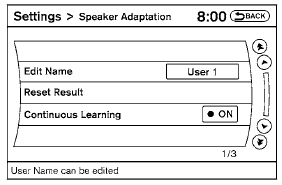
Edit Name:
Edit the user name using the keypad displayed on the screen.
Reset Result:
Resets the user’s voice that the Voice Recognition system has learned.
Continuous Learning:
When this item is turned to ON, you can have the system learn the voice commands in succession, without selecting commands one by one.
See also:
Latch lower anchor location
Latch lower anchor location
The Latch lower anchors are located at the rear
of the seat cushion near the seatback. A label is
attached to the seatback to help you locate the
Latch lower ancho ...
Front seat-mounted side-impact supplemental air bag
and roof-mounted curtain side-impact and rollover
supplemental air bag systems
The side air bags are located in the outside of
the seatback of the front seats. The curtain and
rollover air bags are located in the side roof rails.
These systems are designed to meet volunta ...
Parking/parking on hills.
WARNING
● Do not stop or park the vehicle over
flammable materials such as dry grass,
waste paper or rags. They may ignite
and cause a fire.
● Safe parking procedures require that
...