
Troubleshooting guide
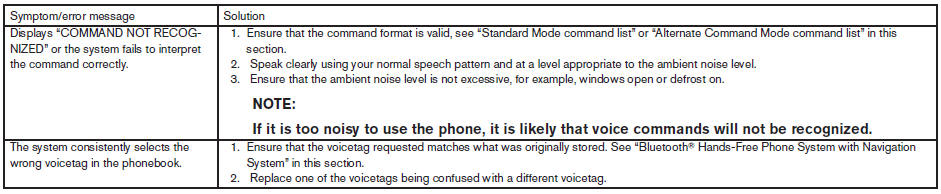
The system should respond correctly to all voice commands without difficulty. If problems are encountered, follow the solutions given in this guide for the appropriate error.
Where the solutions are listed by number, try each solution in turn, starting with number one, until the problem is resolved.
See also:
Engine oil and oil filter recommendations
Selecting the correct oil
It is essential to choose the correct grade, quality
and viscosity engine oil to ensure satisfactory
engine life and performance. See Capacities
and recommended fuel ...
Vehicle load capacity
Do not exceed the load limit of your vehicle
shown as “The combined weight of
occupants and cargo” on the Tire and
Loading Information label. Do not exceed
the number of occupants shown as
†...
Summer tires
NISSAN specifies summer tires on some models
to provide superior performance on dry roads.
Summer tire performance is substantially reduced
in snow and ice. Summer tires do not have
the tire tr ...