
Cruise control
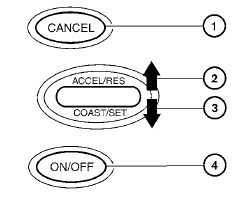
1. CANCEL switch
2. ACCEL/RES switch
3. COAST/SET switch
4. ON/OFF switch
See also:
Tire and loading information label
Sedan
Coupe
The cold tire pressure is shown on the Tire and
Loading Information label. The label is located as
shown. ...
Windshield-washer fluid
Fill the windshield-washer fluid reservoir periodically.
Add windshield-washer fluid when the low
windshield-washer fluid warning light comes on.
To fill the windshield-washer fluid reservoir, li ...
Meters and gauges
Meters and gauges
1. Tachometer
2. Vehicle information display
3. Speedometer
4. Warning/indicator lights
5. Engine coolant temperature gauge
6. switch (twin trip odometer
control and ...