
Battery
● Keep the battery surface clean and dry. Clean the battery with a solution of baking soda and water.
● Make certain the terminal connections are clean and securely tightened.
● If the vehicle is not to be used for 30 days or longer, disconnect the negative (-) battery terminal cable to prevent discharge.
WARNING
● Do not expose the battery to flames, an electrical spark or a cigarette. Hydrogen gas generated by the battery is explosive. Explosive gases can cause blindness or injury. Do not allow battery fluid to contact your skin, eyes, fabrics or painted surfaces. Sulfuric acid can cause blindness or injury. After touching a battery or battery cap, do not touch or rub your eyes. Thoroughly wash your hands. If the acid contacts your eyes, skin or clothing, immediately flush with water for at least 15 minutes and seek medical attention.
● Do not operate the vehicle if the fluid in the battery is low. Low battery fluid can cause a higher load on the battery which can generate heat, reduce battery life, and in some cases lead to an explosion.
● When working on or near a battery, always wear suitable eye protection and remove all jewelry.
● Battery posts, terminals and related accessories contain lead and lead compounds. Wash hands after handling.
● Keep battery out of the reach of children.
● Do not tip the battery. Keep the vent caps tight and the battery level.
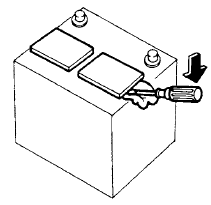
1. Remove the vent caps with a screwdriver as shown. Use a cloth to protect the battery case.
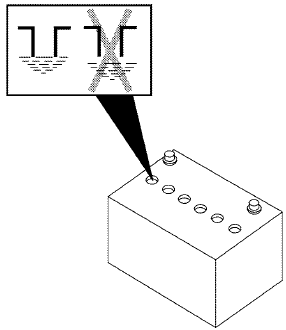
2. Check the fluid level in each cell. If it is necessary to add fluid, add only distilled water to bring the level up to the bottom of the filler opening. Do not overfill. Reinstall the vent caps.
Vehicles operated in high temperatures or under severe conditions require frequent checks of the battery fluid level.
See also:
Overdrive (O/D) OFF switch
When the O/D OFF switch is pushed with the
selector lever in the D (Drive) position, the
indicator light in the instrument panel illuminates.
Use the overdrive off mode when you need
impr ...
Air fresheners
Most air fresheners use a solvent that could
affect the vehicle interior. If you use an air
freshener, take the following precautions:
- Hanging-type air fresheners can cause
permanent discolo ...
Larger children
Children who are too large for child restraints
should be seated and restrained by the seat belts
which are provided. The seat belt may not fit
properly if the child is less than 4 ft 9 in (142. ...