
Extended storage switch (if so equipped)
NOTE:
The extended storage switch is used for long term vehicle storage. Even if the extended storage switch is broken it is not necessary to replace it. Replace only the open fuse in the switch with a new fuse.
How to replace the extended storage switch:
1. To remove the extended storage switch, be
sure the ignition switch is in the OFF or
LOCK position.
2. Be sure the headlight switch is in the OFF
position.
3. Remove the fuse box cover.
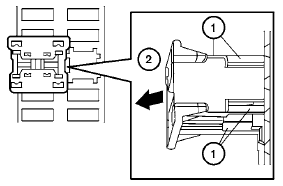
4. Pinch the locking tabs 1 found on each
side of the storage switch.
5. Pull the storage switch straight out from the
fuse box 2 .
See also:
Off button
To change the display brightness, press
the OFF button. Pressing the
button again
will change the display to the day
or the
night display. The brightness
can then be
adjusted using the NI ...
Glove box
Open the glove box by pulling the handle. Use the
master key when locking 1 or unlocking 2 the
glove box.
WARNING
Keep glove box lid closed while driving to
help prevent injury in an accident o ...
Tilt operation
Tilt operation
Pull the lock lever down 1 and adjust the
steering wheel up or down 2 to the desired
position.
Push the lock lever up 3 securely to lock the
steering wheel in place. A clickin ...