
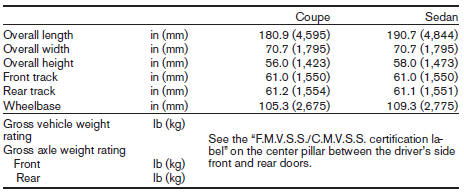
Dimensions and weights
Nissan Altima / Nissan Altima Owners Manual / Technical and consumer information / Specifications / Dimensions and weights
See also:
New Frontier PRO-4X Off-Road Model
Frontier's all-new PRO-4X trim offers drivers outstanding off-road
flexibility, pairing Frontier's already impressive list of standard equipment
features with the PRO-4X's off-road performance enh ...
Selecting the correct oil
It is essential to choose the correct grade, quality
and viscosity engine oil to ensure satisfactory
engine life and performance. See “Capacities
and recommended fuel/lubricants” earlier in thi ...
Exhaust gas (carbon monoxide)
WARNING:
- Do not breathe exhaust gases; they
contain colorless and odorless carbon
monoxide. Carbon monoxide is dangerous.
It can cause unconsciousness or
death.
- If you suspect that exhaus ...