
Warning/indicator lights
Nissan Maxima / Nissan Maxima Owners Manual / Illustrated table of contents / Warning/indicator lights
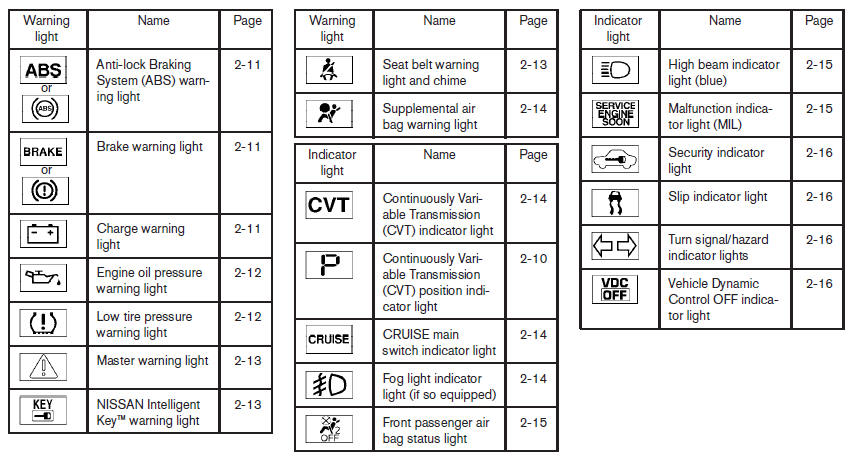
Warning/indicator lights
See also:
Rocking a stuck vehicle
If your vehicle is stuck in sand, snow, mud, etc.,
use the following procedure:
1. Turn off the Vehicle Dynamic Control (VDC)
system.
2. Make sure the area in front and behind the
vehicle is ...
Upper tether anchor/key cylinder covers
CAUTION
Never force the covers into place because
the hinge pins can be damaged. Follow
the removal and installation instructions
to prevent inoperability of the covers. ...
Sway control device
Sudden maneuvers, wind gusts, and buffeting
caused by other vehicles can affect trailer handling.
Sway control devices may be used to help
control these affects. If you choose to use one,
contact ...