
List of voice commands
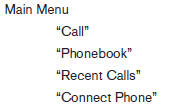
When you press and release the  button on
the steering wheel, you can choose from the
commands on the Main Menu. The following
pages describe these commands and the commands
in each sub-menu.
button on
the steering wheel, you can choose from the
commands on the Main Menu. The following
pages describe these commands and the commands
in each sub-menu.
Remember to wait for the tone before speaking.
After the main menu, you can say “Help” to hear the list of commands currently available any time the system is waiting for a response.
If you want to end an action without completing it, you can say “Cancel” or “Quit” at any time the system is waiting for a response. The system will end the VR session. Whenever the VR session is cancelled, a double beep is played to indicate you have exited the system.
If you want to go back to the previous command, you can say “Go back” or “Correction” any time the system is waiting for a response.
See also:
Front-seat Active Head Restraints
The Active Head Restraint moves forward utilizing
the force that the seatback receives from the
occupant in a rear-end collision. The movement
of the head restraint helps support the occupant’s ...
Indicators for operation
The design of the warnings and alerts may differ
depending on the model.
1. Door open warning
This warning appears if any of the doors are
open or not closed securely. The vehicle icon
indic ...
Warning lights
Anti-lock Braking
System (ABS)
warning light
When the ignition switch is placed in the ON
position, the Anti-lock Braking System (ABS)
warning light illuminates and then turns off. This
...