
Giving voice commands
1. Press the  switch located on
the steering
wheel.
switch located on
the steering
wheel.
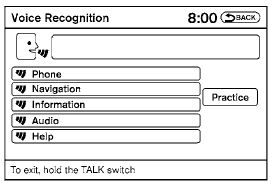
2. A list of commands appears on the screen, and the system announces, “Would you like to access Phone, Navigation, Information, Audio or Help?”
3. After the tone sounds and the icon on the
screen changes from  to
to
 , speak
a command.
, speak
a command.
4. Continue to follow the voice menu prompts and speak after the tone sounds until your desired operation is completed.
See also:
Compact disc (CD) player operation
Place the ignition switch in the ACC or ON
position, and carefully insert the compact disc
into the slot with the label side up. The compact
disc is automatically pulled into the slot and starts
t ...
Rearview mirror (if so equipped)
The night position 1 reduces glare from the
headlights of vehicles behind you at night.
Use the day position 2 when driving in daylight
hours.
WARNING
Use the night position only when necessary ...
Loose Fuel Cap warning
The LOOSE FUEL CAP warning appears in the
vehicle information display when the fuel-filler
cap is not tightened correctly after the vehicle has
been refueled. It may take a few driving trips for
...