
Turn signal switch
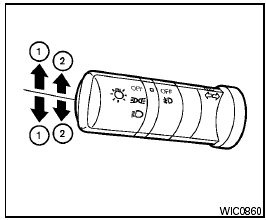
Turn signal switch
Turn signal
1 Move the lever up or down to signal the turning direction. When the turn is completed, the turn signals cancel automatically.
Lane change signal
2 To signal a lane change, move the lever up or down to the point where the indicator light begins to flash, but the lever does not latch.
See also:
Starting the vehicle
1. After starting the engine, fully depress the
foot brake pedal before moving the selector
lever out of the P (Park) position.
This CVT is designed so that the foot
brake pedal must be depress ...
Installing the spare tire
The spare tire is designed for emergency
use. See specific instructions under the
heading “Wheels and tires” in the “Maintenance
and do-it-yourself” section of this
manual.
1. Clean any ...
Locking doors
1. Turn the ignition switch to the LOCK position.1
2. Carry the Intelligent Key with you.
3. Close all the doors.2
4. Push the door handle request switch (driver’s or front passenger’s) A or ...