
Mechanical key
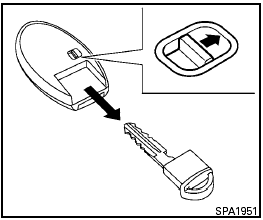
Mechanical key
The Intelligent Key contains the mechanical key, which can be used in case of a discharged battery.
To remove the mechanical key, release the lock knob on the back of the Intelligent Key.
To install the mechanical key, firmly insert it into the Intelligent Key until the lock knob returns to the lock position.
The mechanical key can be used for operation in the same way as an ordinary key.

Always carry the mechanical key installed in the Intelligent Key slot.
See “Doors” in this section and “Storage” in the “Instruments and controls” section of this manual.
See also:
Supplemental air bag warning light
The supplemental air bag warning light,
displaying in the instrument panel,
monitors
the circuits for the air bag systems, pretensioners
and all related wiring.
When the ignition is placed in t ...
Brake system
The brake system has two separate hydraulic
circuits. If one circuit malfunctions, you will still
have braking at 2 wheels. ...
Opening the fuel-filler door
Opening the fuel-filler door
To open the fuel-filler door, pull the left side of
the door. ...