
Unlocking doors
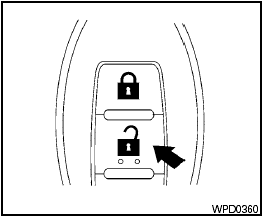
Unlocking doors
1. Press the  button on the
Intelligent
Key.
button on the
Intelligent
Key.
2. The hazard warning lights flash once.
3. Press the button again within 60
seconds
to unlock all doors.
All doors will be locked automatically unless one
of the following operations is performed within 1
minute after pressing the button.
● Opening any doors.
● Pushing the ignition switch.
● Inserting the mechanical key into the ignition switch.
The interior light illuminates for a maximum of 30 seconds when a door is unlocked and the room light switch is in the DOOR position.
The light can be turned off without waiting for 30 seconds by performing one of the following operations.
● Placing the ignition switch in the ON position.
● Locking the doors with the remote controller.
● Switching the room light switch to the OFF position.
See also:
Vehicle Phonebook
This vehicle has two phonebooks available for
your use. Depending on your phone, the system
may automatically download your entire cell
phones phonebook into the Handset Phonebook
. For the ...
Hood
- Make sure the hood is completely
closed and latched before driving.
Failure to do so could cause the
hood to fly open and result in an
accident.
- If you see steam or smoke coming
from ...
Front power seat adjustment
Operating tips:
- The seat motor has an auto-reset overload
protection circuit. If the motor stops during
operation, wait for a while, then reactivate
the switch.
- Do not operate the power se ...