
Using the panic alarm
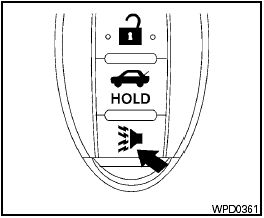
Using the panic alarm
If you are near your vehicle and feel threatened,
you may activate the panic alarm to call attention
by pressing and holding the  button on the
Intelligent Key for longer than 0.5 seconds.
button on the
Intelligent Key for longer than 0.5 seconds.
The panic alarm and headlights will stay on for 25 seconds.
The panic alarm stops when:
● It has run for 25 seconds, or
● Any button is pressed on the Intelligent Key.
● Pushing the request switch on the driver or
passenger door with the Intelligent Key in
range of the door handle.
See also:
NISSAN Vehicle Immobilizer System keys
You can only drive your vehicle using the master
keys which are registered to the NISSAN Vehicle
Immobilizer System components in your vehicle.
The master key can be used for all the locks.
Never ...
Replacing wheels and tires
When replacing a tire, use the same size, tread
design, speed rating and load carrying capacity
as originally equipped. (See “Specifications” in
the “9. Technical and consumer informationâ ...
Exterior
The 2.0, 2.0 S and 2.0 SL received redesigned grilles and front-end designs
in 2010, as well as new taillights. The 2.0 SR separates itself from those
models with sportier styling cues, including ...