
Control panel buttons — color screen with Navigation System (if so equipped)
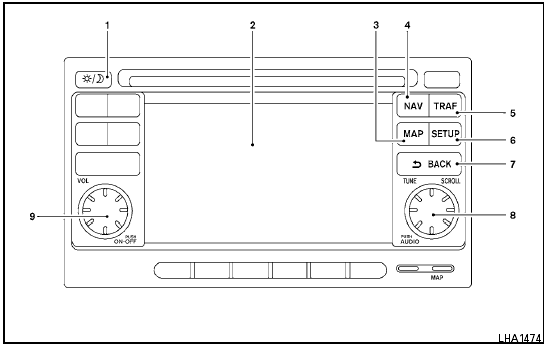
Control panel buttons — color screen with Navigation System (if so equipped)
1.  (brightness control) button
2. Display screen
3. MAP button*
4. NAV button*
5. TRAF button*
6. SETUP button
7.  BACK button
8. TUNE/SCROLL knob
9. Power button/Volume control knob
*For Navigation system control buttons, refer to the separate Navigation System Owner’s Manual.
When you use this system, make sure the engine is running.
If you use the system with the engine not running (ignition ON or ACC) for a long time, it will discharge the battery, and the engine will not start.
Reference symbols:
“Example” — Words marked in quotes refer to a key shown only on the display. These keys can be selected by touching the screen.
See also:
When reading the manual
This manual includes information for all options
available on this model. Therefore, you may find
some information that does not apply to your
vehicle.
All information, specifications and illus ...
Exterior rear
1. Trunk lid
2. Vehicle loading
3. Interior trunk lid release
4. Rear window defroster switch
5. Child safety locks
6. Fuel-filler door
7. Fuel-filler cap, fuel recommendation
8. Repla ...
Operating the HomeLink universal transceiver
The HomeLink Universal Transceiver (once programmed)
may now be used to activate the garage
door, etc. To operate, simply press the appropriate
programmed HomeLink Universal
Transceiver button ...