
How to read the displayed lines
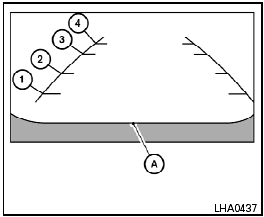
Without Navigation System
Lines which indicate the vehicle clearance and distances to objects with reference to the bumper line A are displayed on the monitor.
They are indicated as reference distances to objects. The lines and colors in the display indicate distances from the back bumper line A in the illustration.
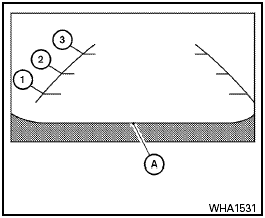
With Navigation System
1 1.5 ft (0.5 m) red
2 3 ft (1 m) yellow
3 7 ft (2 m) green
4 10 ft (3 m) green (models without Navigation System
only)
The vehicle clearance lines are wider than the actual clearance.
See also:
Off-road recovery
If the right side or left side wheels unintentionally
leave the road surface, maintain control of the
vehicle by following the procedure below. Please
note that this procedure is only a general gui ...
Head restraints
WARNING:
Head restraints supplement the other vehicle
safety systems. They may provide
additional protection against injury in certain
rear end collisions. Adjust the head
restraints properly ...
How to see each view
- The distance guide line and the
vehicle width line should be used
as a reference only when the vehicle
is on a paved, level surface. The
distance viewed on the monitor is
for reference ...