
List of voice commands
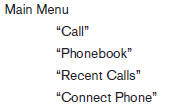
When you press and release the  button on
the steering wheel, you can choose from the
commands on the Main Menu. The following
pages describe these commands and the commands
in each sub-menu.
button on
the steering wheel, you can choose from the
commands on the Main Menu. The following
pages describe these commands and the commands
in each sub-menu.
Remember to wait for the tone before speaking.
After the main menu, you can say “Help” to hear the list of commands currently available any time the system is waiting for a response.
If you want to end an action without completing it, you can say “Cancel” or “Quit” at any time the system is waiting for a response. The system will end the VR session. Whenever the VR session is cancelled, a double beep is played to indicate you have exited the system.
If you want to go back to the previous command, you can say “Go back” or “Correction” any time the system is waiting for a response.
See also:
Aftermarket fuel additives
NISSAN does not recommend the use of any
aftermarket fuel additives (for example, fuel injector
cleaner, octane booster, intake valve deposit
removers, etc.) which are sold commercially.
Many of t ...
Changing engine oil
MR20DE engine
A Oil filler cap
B Oil drain plug
C Oil filter
QR25DE engine
A Oil filler cap
B Oil drain plug
C Oil filter
1. Park the vehicle on a level surface and apply
the parking ...
Outside mirrors
Objects viewed in the outside mirror on
the passenger side are closer than they
appear. Be careful when moving to the
right. Using only this mirror could cause
an accident. Use the inside ...