
FM/AM/SAT radio with compact disc (CD) player (Type A) (if so equipped)
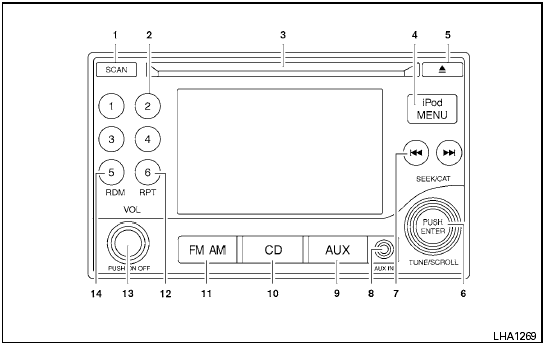
Type A
1. SCAN button
2. Station select (1 - 6) buttons
3. CD insert slot
4. iPod MENU button
5.  CD
eject button
CD
eject button
6. TUNE/SCROLL knob/Setting control button
7. SEEK/CAT buttons
8. AUX IN jack
9. AUX button*
10. CD button
11. FM-AM button
12. RPT button
13. POWER/VOLUME control knob
14. RDM button
*No satellite radio reception is available when the AUX button is pressed to access satellite radio stations unless optional satellite receiver and antenna are installed and an XM satellite radio service subscription is active. Satellite radio is not available in Alaska, Hawaii and Guam.
For all operation precautions, see Audio operation precautions in this section.
See also:
Intelligent Key system (if so equipped)
- Radio waves could adversely affect
electric medical equipment. Those
who use a pacemaker should contact
the electric medical equipment
manufacturer for the possible influences
before u ...
Small When You Need It, Big Where You Want It
Knowing that entry-level vehicles are used as "workhorses" - for commuting on
weekdays, errand running on weekends and transporting family and friends all
week long - the designers of th ...
Making a call
To make a call, follow the procedure below:
1. Press the PHONE button on the instrument
panel or the switch on the
steering
wheel. The Phone screen will appear on
the display.
2. Select on ...