
CD care and cleaning
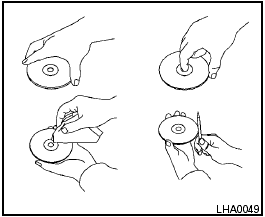
CD care and cleaning
● Handle a CD by its edges. Do not bend the disc. Never touch the surface of the disc.
● Always place the discs in the storage case when they are not being used.
● To clean a disc, wipe the surface from the center to the outer edge using a clean, soft cloth. Do not wipe the disc using a circular motion.
● Do not use a conventional record cleaner or alcohol intended for industrial use.
● A new disc may be rough on the inner and outer edges. Remove the rough edges by rubbing the inner and outer edges with the side of a pen or pencil as illustrated.
See also:
Covered storage box
Push the center of the lid to open. ...
NISSAN Intelligent Key™ Operation
NISSAN Intelligent Key™ Operation
You can lock or unlock the doors without taking
the Intelligent Key out of your pocket or bag.
When you carry the Intelligent Key with you, you
can lock or ...
Towing your vehicle
When towing your vehicle, all State (Provincial in
Canada) and local regulations for towing must be
followed. Incorrect towing equipment could damage
your vehicle. Towing instructions are availa ...