
Troubleshooting guide
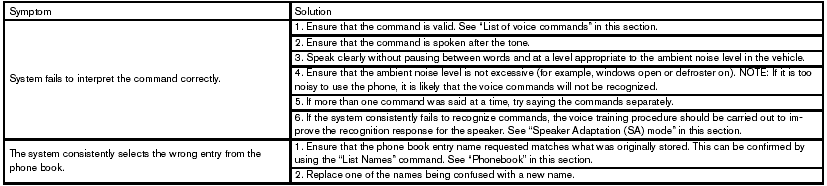
The system should respond correctly to all voice commands without difficulty. If problems are encountered, try the following solutions.
Where the solutions are listed by number, try each solution in turn, starting with number 1, until the problem is resolved.
See also:
Warning signals
To help prevent the vehicle from moving unexpectedly
by erroneous operation of the Intelligent
Key or to help prevent the vehicle from being
stolen, a chime or buzzer sounds from inside and
outsid ...
Turn signal switch
Turn signal switch
Turn signal
1 Move the lever up or down to signal the
turning direction. When the turn is completed,
the turn signals cancel automatically.
Lane change signal
2 To signal ...
Engine coolant temperature gauge
Engine coolant temperature gauge
NOTE:
The ignition switch must be placed in the
ON position for the gauge to give a reading.
The gauge indicates the engine coolant temperature.
The engine ...