
Turn signal switch
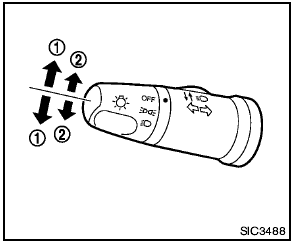
1 Turn signal
Move the lever up or down to signal the turning direction. When the turn is completed, the turn signals cancel automatically.
2 Lane change signal
To indicate a lane change, move the lever up or down to the point where lights begin flashing.
See also:
Training phrases
During the SA mode, the system instructs the
trainer to say the following phrases. (The system
will prompt you for each phrase.)
● phonebook transfer entry
● dial three oh four two nin ...
Difference between predicted and actual distances
The distance guide line and the vehicle width
guide line on the front and the rear view should
be used as a reference only when the vehicle is
on a level, paved surface. The distance viewed
on ...
Electric power steering system
- If the engine is not running or is
turned off while driving, the power
assist for the steering will not work.
Steering will be harder to operate.
- When the electric power steering
warni ...