
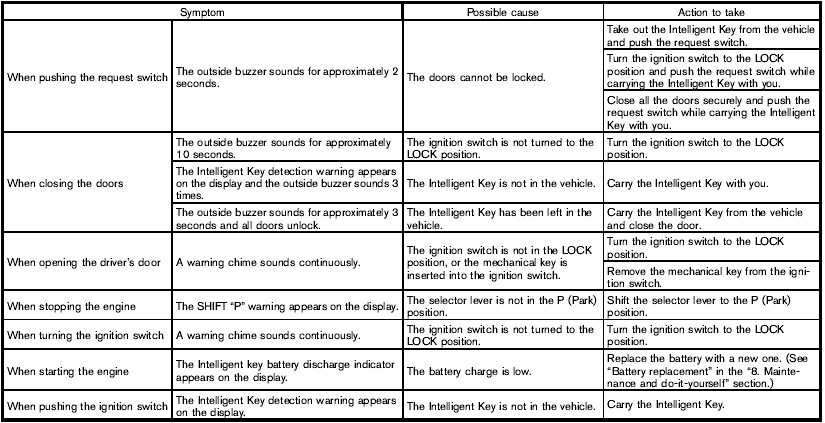
Troubleshooting guide
Nissan Rogue / Nissan Rogue Owners Manual / Pre-driving checks and adjustments / Intelligent Key system (if so equipped) / Troubleshooting guide
See also:
Exterior rear
Exterior rear
1. Lift gate
— Intelligent Key system*
2. Rear view camera*
3. Rear window wiper and washer
— Switch operation
— Window washer fluid
4. Rear window defroster
5. Hi ...
Slip indicator light
This indicator will blink when the VDC system or
the traction control system is operating, thus
alerting that the vehicle is nearing its traction
limits. The road surface may be slippery. ...
Event Data Recorders (EDR)
GUID-D562961D-9AFE-4754-8C59-8C01CE2FEDDB
This vehicle is equipped with an Event Data
Recorder (EDR). The main purpose of an EDR is
to record, in certain crash or near crash-like
situations, s ...