
CD/DVD
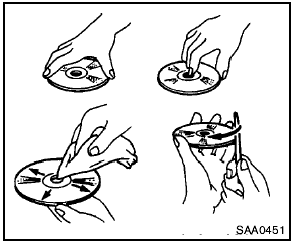
- Handle a CD/DVD by its edges. Never touch the surface of the disc. Do not bend the disc.
- Always place the discs in the storage case when they are not being used.
- To clean a disc, wipe the surface from the center to the outer edge using a clean, soft cloth. Do not wipe the disc using a circular motion.
Do not use a conventional record cleaner or alcohol intended for industrial use.
- A new disc may be rough on the inner and outer edges. Remove the rough edges by rubbing the inner and outer edges with the side of a pen or pencil as illustrated.
See also:
Trunk light
The light illuminates when the trunk lid is opened.
When the trunk lid is closed, the light goes off.
The light will go off after about 30 minutes if the
trunk lid is left open, unless the ignitio ...
Pregnant women
NISSAN recommends that pregnant women use
seat belts. The seat belt should be worn snug and
always position the lap belt as low as possible
around the hips, not the waist. Place the shoulder
b ...
Removing covers from rear parcel shelf
Remove the top tether anchor cover or key cylinder
cover as follows:
1. Lift the cover to the full open position.
2. Rotate the cover in the direction shown,
disengaging the hinge at 1 and sli ...