
Antenna
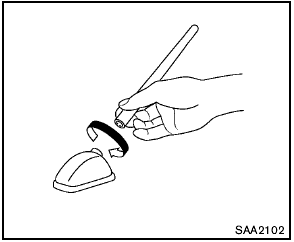
Antenna
To remove the antenna, hold the bottom of the antenna and turn it counterclockwise.
To install the antenna, turn the antenna clockwise and tighten.

- To avoid damaging or deforming the antenna, be sure to remove the antenna under the following conditions.
— The vehicle enters an automatic car wash.
— The vehicle enters a garage with a low ceiling.
— The vehicle is covered with a car cover.
- Always properly tighten the antenna rod during installation. Otherwise, the antenna rod may break during vehicle operation.
See also:
Read firstthen drive safety
Before driving your vehicle, please read this
Owners Manual carefully. This will ensure familiarity
with controls and maintenance requirements,
assisting you in the safe operation of your
vehi ...
USB interface (models without Navigation System) (if so equipped)
Connecting a device to the USB input
jack
The USB input jack is located in the center console.
Open the protective cover (1) on the USB
jack, then insert the USB device into the jack.
When a ...
High Points
Though it has cheaper rear drum brakes — the norm for this class — the Versa
stops confidently, with strong, linear pedal feel. Ride comfort is another plus.
The last Versa was a soft car, and ...