
Warning/indicator lights and audible reminders
Nissan Maxima / Nissan Maxima Owners Manual / Instruments and controls / Warning/indicator lights and audible reminders
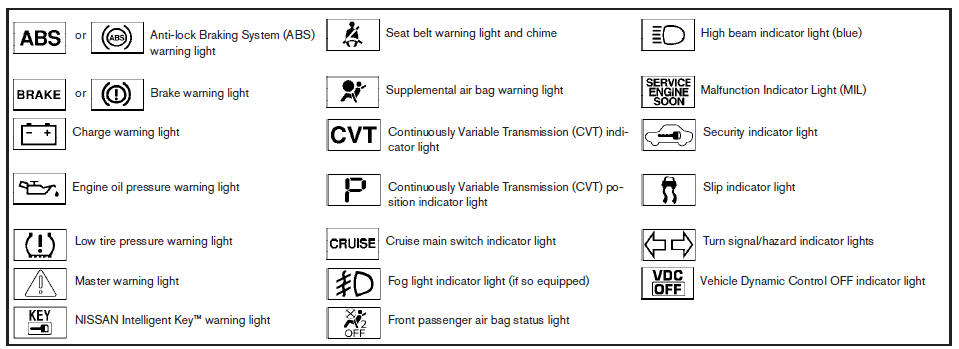
Warning/indicator lights and audible reminders
See also:
Small When You Need It, Big Where You Want It
Knowing that entry-level vehicles are used as "workhorses" - for commuting on
weekdays, errand running on weekends and transporting family and friends all
week long - the designers of th ...
Safety
Standard features include dual-stage front airbags, seat-mounted side-impact
airbags and side curtain-type airbags. The seat belts have pretensioners and
load limiters. Active head restraints for ...
Cup holders
- Avoid abrupt starting and braking
when the cup holder is being used
to prevent spilling the drink. If the
liquid is hot, it can scald you or your
passenger.
- Use only soft cups in th ...