
Locking with key
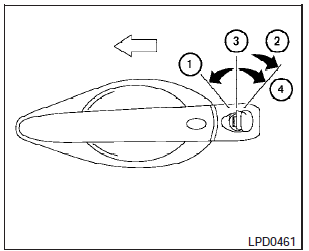
Drivers side
The power door lock system allows you to lock or unlock all doors at the same time.
Turning the key toward the front (1) of the vehicle locks all doors.
Turning the key one time toward the rear (2)- of the vehicle unlocks that door. From that position, returning the key to neutral (3)- (where the key can only be removed and inserted) and turning it toward the rear again within 60 seconds unlocks all doors (4).
Opening and closing windows
The drivers door key operation allows you to open and close windows equipped with automatic operation at the same time.
- To open the windows, turn the drivers door key toward the rear of the vehicle for longer than 1 second after the door is unlocked.
- To close the windows, turn the drivers door key toward the front of the vehicle for longer than 1 second after the door is locked.
Windows stop when the key cylinder is released.
See also:
Windshield wiper and washer switch
In freezing temperatures the washer
solution may freeze on the windshield
and obscure your vision which may lead
to an accident. Warm windshield with
the defroster before you wash the
wi ...
Shifting
After starting the engine, fully depress the brake
pedal and move the shift selector from P (Park) to
any of the desired shift positions.
WARNING
Apply the parking brake if the shift selector
is ...
Headlights
Replacing the xenon headlight bulb (if
so equipped)
HIGH VOLTAGE:
When xenon headlights are on, they produce
a high voltage. To prevent an electric
shock, never attempt to modify or disassembl ...