
Bluetooth settings
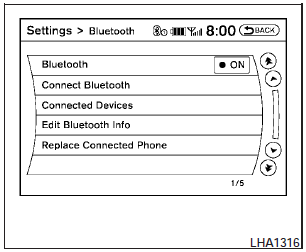
To set up the Bluetooth Hands-Free Phone System to your preferred settings, press the SETTING button on the instrument panel and select the Bluetooth key on the display.
Bluetooth:
Turn the Bluetooth system on or off.
Connect Bluetooth:
See Connecting procedure in this section for more information about connecting a phone.
Connected Devices:
Display a list of the Bluetooth devices connected to the system.
Edit Bluetooth Info:
Check information about the device name, device address and device PIN.
Replace Connected Phone:
Replace the phone currently connected to the system. This option allows you to keep any voicetags that were recorded using the previous phone.
See also:
Warning lights
All-Wheel Drive (AWD) warning
light (AWD models)
The light illuminates when the ignition switch is
turned to the ON position. It turns off after the
engine is started.
If the All-Wheel Drive ...
If your vehicle is stolen
If your vehicle is stolen, you should change the
codes of any non-rolling code device that has
been programmed into HomeLink. Consult the
Owners Manual of each device or call the manufacturer
...
Warning/indicator lights
Warning
light
Name
Anti-lock Braking
System (ABS) warning
light
Brake warning light
Charge warning light
Door open warning
...