
Troubleshooting guide
The system should respond correctly to all voice commands without difficulty. If problems are encountered, follow the solutions given in this guide for the appropriate error.
Where the solutions are listed by number, try each solution in turn, starting with number one, until the problem is resolved.
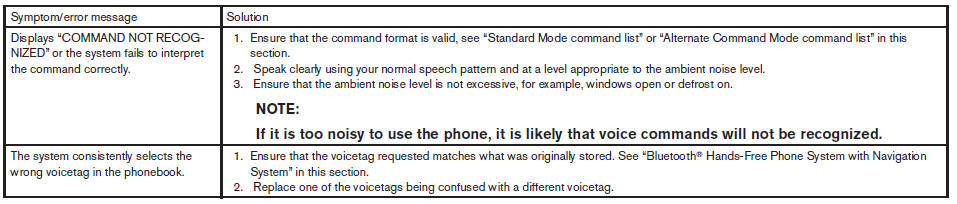 TROUBLESHOOTING GUIDE
See also:
Exterior front
Exterior front
1. Engine hood.
2. Windshield wiper and washer switch.
3. Windshield.
4. Moonroof (if so equipped).
5. Power windows.
6. Door locks, Nissan Intelligent Key,
keys, request butt ...
When traveling or registering your vehicle in
another country
When planning to drive your NISSAN vehicle
in another country, you should first find
out if the fuel available is suitable for your vehicle’s
engine.
Using fuel with an octane rating that is ...
Trunk light
The light illuminates when the trunk lid is opened.
When the trunk lid is closed, the light goes off.
The light will go off after about 15 minutes if the
trunk lid is left open, unless the ignition ...