
Specifications. Wheels and tires
Nissan Maxima / Nissan Maxima Owners Manual / Technical and consumer information / Specifications. Wheels and tires
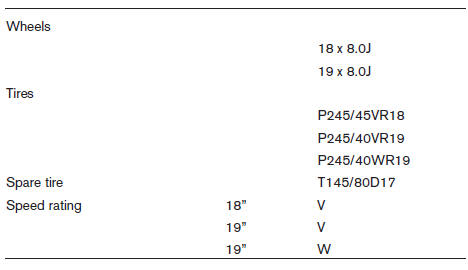
WHEELS AND TIRES
See also:
NISSAN Intelligent Key
Your vehicle can only be driven with the Intelligent
Keys which are registered to your vehicles Intelligent
Key system components and NISSAN Vehicle
Immobilizer System components.
Never leave t ...
Temperature
A temperature increase will accelerate the rate
of corrosion to those parts which are not well
ventilated. ...
How to use the back button
Press the BACK button to return to the
previous screen. ...