
Indicators for maintenance
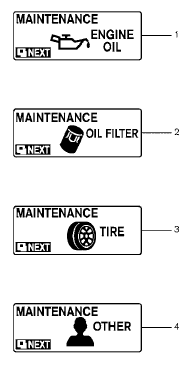
Indicators for maintenance
1. Engine oil replacement indicator This indicator appears when the customer set distance comes for changing the engine oil. You can set or reset the distance for changing the engine oil. See “Maintenance mode” earlier in this section.
2. Oil filter replacement indicator This indicator appears when the customer set distance comes for replacing the oil filter. You can set or reset the distance for replacing the oil filter. See “Maintenance mode” earlier in this section.
3. Tire replacement indicator This indicator appears when the customer set distance comes for replacing tires. You can set or reset the distance for replacing tires. See “Maintenance mode” earlier in this section.
WARNING
The tire replacement indicator is not a substitute for regular tire checks, including tire pressure checks. See “Changing Wheels and Tires” in “Maintenance & Do- It-Yourself” section. Many factors including tire inflation, alignment, driving habits and road conditions affect tire wear and when tires should be replaced. Setting the tire replacement indicator for a certain driving distance does not mean your tires will last that long. Use the tire replacement indicator as a guide only and always perform regular tire checks. Failure to perform regular tire checks, including tire pressure checks could result in tire failure. Serious vehicle damage could occur and may lead to a collision, which could result in serious personal injury or death.
4. “OTHER” indicator
This indicator appears when the customer set distance comes for checking or replacing maintenance items other than the engine oil, oil filter and tires. Other maintenance items can include such things as air filter or tire rotation. You can set or reset the distance for checking or replacing the items. See “Maintenance mode” earlier in this section. For scheduled maintenance items and intervals, see your “NISSAN Service and Maintenance Guide.”
See also:
Heater and air conditioner (automatic) (Type B)
Type B
1. Temperature control dial (drivers side)/
AUTO (automatic) climate control ON
button
2. A/C (air conditioner) ON/OFF button
3. Air recirculation button
4. Fresh air intake butto ...
Console box
Console box
To open the console box, press in on the lever 1
and raise the lid 2 .
To close, push the lid down until the lock latches. ...
Interior light
Type A
The interior light has a three-position switch and
operates regardless of ignition switch position.
● When the switch is in the ON position 1 ,
the interior light illuminates, regar ...