
Mechanical key
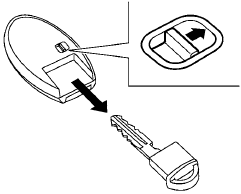
The Intelligent Key contains the mechanical key. To remove the mechanical key, release the lock knob on the back of the Intelligent Key.
To install the mechanical key, firmly insert it into the Intelligent Key until the lock knob returns to the lock position.
Use the mechanical key to lock or unlock the doors, trunk lid, glove box and rear seatback lock. See “Doors” and “Trunk lid” in this section, “Storage” in the “Instruments and controls” section, “Seats” in the “Safety — Seats, seat belts and supplemental restraint system” section, and “Upper tether anchor/key cylinder covers” in the “Maintenance and do-it-yourself” section of this manual.
CAUTION
Always carry the mechanical key installed in the Intelligent Key slot.
See also:
Next-Generation Efficiency and an All-New V Platform
One of the biggest challenges in designing a compact sedan, of course, is
where to put everything - people, cargo, engine, transmission and other
mechanical components. Often the solution is to ga ...
CD/DVD
- Handle a CD/DVD by its edges. Never touch
the surface of the disc. Do not bend the
disc.
- Always place the discs in the storage case
when they are not being used.
- To clean a disc, wipe ...
Proficient Driving
The Rogue typifies the small-crossover driving experience. Its steering wheel
turns with a light touch at low speeds and tracks reasonably well on the
highway, and the sole drivetrain — a 2.5-li ...