
Door locks/unlocks precaution
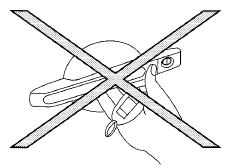
● Do not push the door handle request switch with the Intelligent Key held in your hand as illustrated. The close distance to the door handle will cause the Intelligent Key system to have difficulty recognizing that the Intelligent Key is outside the vehicle.
● After locking with the door handle request switch, verify the doors are securely locked by testing them.
● To prevent the Intelligent Key from being left inside the vehicle, make sure you carry the Intelligent Key with you and then lock the doors.
● Do not pull the door handle before pushing the door handle request switch. The door will be unlocked but will not open. Release the door handle once and pull it again to open the door.
See also:
Heater and air conditioner (automatic) (Type B)
Type B
1. Temperature control dial (drivers side)/
AUTO (automatic) climate control ON
button
2. A/C (air conditioner) ON/OFF button
3. Air recirculation button
4. Fresh air intake butto ...
Locking doors
Locking doors
1. Place the ignition switch in the LOCK position.
(Remove the key if any key is in the
ignition switch.)
2. Close all doors.
3. Push any door handle request switch 1
while ca ...
Increasing fuel economy
● Accelerate slowly and smoothly. Maintain
cruising speeds with a constant accelerator
position.
● Drive at moderate speeds on the highway.
Driving at high speed lowers fuel economy.
...