
Locking doors
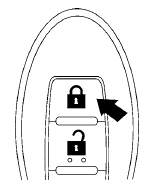
1. Place the ignition switch in the LOCK position.
2. Close all doors.
3. Press the  button on the
Intelligent
Key.
button on the
Intelligent
Key.
4. The hazard warning lights flash twice and
the horn beeps once.
5. All doors will be locked.
CAUTION
After locking the doors using the Intelligent Key, be sure that the doors have been securely locked by operating the door handles.
See also:
When reading the manual
This manual includes information for all options
available on this model. Therefore, you may find
some information that does not apply to your
vehicle.
All information, specifications and illus ...
Trailer lights
When splicing into the vehicle electrical
system, a commercially available
power-type module/converter must be
used to provide power for all trailer
lighting. This unit uses the vehicle
...
NISSAN Intelligent Key™ With Door and Trunk
WARNING
● Radio waves could adversely affect
electric medical equipment. Those who
use a pacemaker should contact the
electric medical equipment manufacturer
for the possible influences bef ...