
Releasing the trunk lid
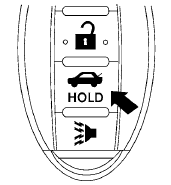
Press the  button for longer than
0.5 seconds
to open the trunk lid. The trunk release
button will not operate when the ignition switch is
in the ON position or when the trunk cancel
switch is in the OFF position. See “Cancel
switch” in this section.
button for longer than
0.5 seconds
to open the trunk lid. The trunk release
button will not operate when the ignition switch is
in the ON position or when the trunk cancel
switch is in the OFF position. See “Cancel
switch” in this section.
See also:
Remote keyless entry system (if so equipped)
It is possible to lock/unlock all doors (including
the lift gate), and activate the panic alarm by
using the keyfob from outside the vehicle.
Before locking the doors, make sure the
key is not ...
Making a call
To make a call, follow the procedure below:
1. Press the button on the
steering
wheel. The “Phone” screen will appear on
the display.
2. Select one of the following options to make a
call: ...
Engine compartment check locations
Engine compartment check locations
1. Power steering fluid reservoir.
2. Engine oil filler cap.
3. Brake fluid reservoir.
4. Air cleaner.
5. Fuse block.
6. Battery.
7. Fuse/Fusible link box.
...