
How to use the SETTING button
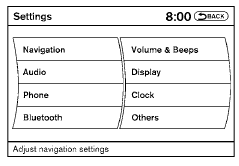
When the SETTING button is pressed, the Settings screen will appear on the display. You can select and/or adjust several functions, features and modes that are available for your vehicle.
See also:
Cargo light
Cargo light
When the switch is in the ON position 1 , the
light illuminates while the lift gate is opened.
When the lift gate is closed, the light will turn off.
When the switch is in the OFF p ...
Speaker Adaptation function settings
Edit Name:
Edit the user name using the keypad displayed on
the screen.
Reset Result:
Resets the user’s voice that the Voice Recognition
system has learned.
Continuous Learning:
When this i ...
Wheels and tires
If you have a flat tire, see “Flat tire” in the
“In case of emergency” section of this
manual. ...