
Call volume
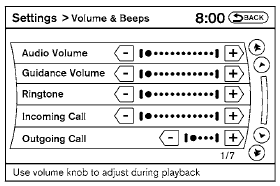
Adjusting the incoming or outgoing call volume may improve clarity if reception between callers is unclear.
● Incoming call—adjusting this setting allows you to hear a difference in volume.
● Outgoing call—adjusting this setting allows the person you are talking with to hear a difference in volume.
To access the settings, press the SETTING button, then select “Volume & Beeps”.
You can also adjust the volume of an incoming voice during a call by pushing the volume control switch on the steering wheel or by turning the volume control knob on the instrument panel.
See also:
“Recent Calls”
Use the Recent Calls command to access outgoing,
incoming or missed calls.
“Outgoing” A
Use the Outgoing command to list the outgoing
calls made from the vehicle.
“Incoming” B
Use th ...
Seat belts with pretensioners (front seats)
- The pretensioners cannot be reused
after activation. They must be replaced
together with the retractor
and buckle as a unit.
- If the vehicle becomes involved in a
collision but a prete ...
Checking engine coolant level
Check the coolant level in the reservoir when
the engine is cold. If the coolant level is below
the MIN level B , add coolant to the MAX level
A . If the reservoir is empty, check the coolant
le ...