
Giving voice commands
1. Press the  switch located on
the steering
wheel.
switch located on
the steering
wheel.
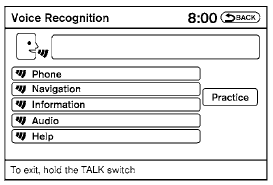
2. A list of commands appears on the screen, and the system announces, “Would you like to access Phone, Navigation, Information, Audio or Help?”
3. After the tone sounds and the icon on the
screen changes from  to
to
 , speak
a command.
, speak
a command.
4. Continue to follow the voice menu prompts and speak after the tone sounds until your desired operation is completed.
See also:
Styling
There's nothing like a first glance to grab shoppers' interest, but the
Maxima's looks are a bit strange. It has elegant curves all over, especially in
the rear, that remind me of the most recent ...
SAFETY
The Rogue received the top score of Good in front, side and rear crash tests
from the Insurance Institute for Highway Safety. In past years, these scores
–
when coupled with the Rogue's standar ...
Fourth generation
The fourth generation Altima was announced at the 2006 New York Auto Show on
April 12, 2006. It is the first vehicle to use the smaller Nissan D platform,
with a new front and upgraded rear suspen ...