
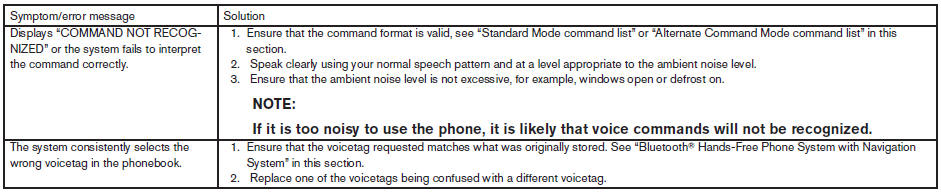
Troubleshooting guide
The system should respond correctly to all voice commands without difficulty. If problems are encountered, follow the solutions given in this guide for the appropriate error.
Where the solutions are listed by number, try each solution in turn, starting with number one, until the problem is resolved.
See also:
Automatic moonroof
The moonroof will only operate when the ignition
switch is placed in the ON position. The automatic
moonroof is operational for about 45 seconds,
even if the ignition switch is placed in the
ACC ...
Loose Fuel Cap warning
The LOOSE FUEL CAP warning appears in the
vehicle information display when the fuel-filler
cap is not tightened correctly after the vehicle has
been refueled. It may take a few driving trips for
...
Sunglasses holder
To open the sunglasses holder, push and release.
Only store one pair of sunglasses in the holder.
WARNING
Keep the sunglasses holder closed while
driving to prevent an accident.
CAUTION
● ...