
Push-Button Ignition Switch
WARNING
Do not operate the push-button ignition switch while driving the vehicle except in an emergency. (The engine will stop when the ignition switch is pushed 3 consecutive times in quick succession or the ignition switch is pushed and held for more than 2 seconds.) If the engine stops while the vehicle is being driven, this could lead to a crash and serious injury.
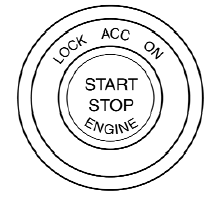
When the ignition switch is pushed without depressing the brake pedal (CVT) or the clutch pedal (M/T), the ignition switch position will illuminate as follows:
Push center
● once to change to ACC.
● two times to change to ON.
● three times to return to OFF.
The ignition switch will automatically return to the LOCK position when any door is either opened or closed with the switch in the OFF position.
The ignition lock is designed so that the ignition switch position cannot be switched to OFF until the shift selector is moved to the P (Park) position (CVT) or N (Neutral) position (M/T).
When the ignition switch cannot be pushed toward the OFF position, proceed as follows:
1. Move the shift selector into the P (Park)
position (CVT) or N (Neutral) position (M/T).
2. Push the ignition switch. The ignition switch
position will change to the ON position.
3. Push the ignition switch again to the OFF
position.
The shift selector can be moved from the P (Park) position if the ignition switch is in the ON position and the brake pedal is depressed.
If the battery of the vehicle is discharged, the push-button ignition switch cannot be moved from the LOCK position.
Some indicators and warnings for operation are displayed on the vehicle information display. See “Vehicle information display” in the “Instruments and controls” section.
See also:
Backing up near a projecting object
Backing up near a projecting object
The vehicle may seem to nearly clear the object
in the display. However, the vehicle may hit the
object if it projects over the actual backing up
course. ...
Getting started
Before using the Voice Recognition system for
the first time, you can confirm how to use commands
by viewing the Getting Started section of
the User Guide.
1. Select the “Getting Started” ke ...
NISSAN Intelligent Key Operation
You can lock or unlock the doors without taking
the Intelligent Key out of your pocket or bag.
When you carry the Intelligent Key with you, you
can lock or unlock all doors by pushing the door ...