
Extended storage switch (if so equipped)
NOTE:
The extended storage switch is used for long term vehicle storage. Even if the extended storage switch is broken it is not necessary to replace it. Replace only the open fuse in the switch with a new fuse.
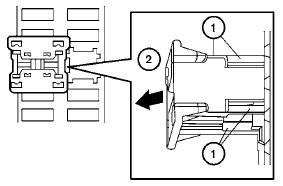
How to replace the extended storage switch:
1. To remove the extended storage switch, be
sure the ignition switch is in the OFF or
LOCK position.
2. Be sure the headlight switch is in the OFF
position.
3. Remove the fuse box cover.
4. Pinch the locking tabs 1 found on each
side of the storage switch.
5. Pull the storage switch straight out from the
fuse box 2 .
See also:
Audio main operation
VOL/ON·OFF control:
Place the ignition switch in the ACC or ON
position and push the VOL/ON·OFF control knob
while the system is off to call up the mode (radio,
CD, AUX, USB or iPod ) that wa ...
2011 Nissan Altima review
I had five hours to think. That's how long it took to drive seven miles from
downtown Washington to my home in Northern Virginia.
The culprit was a fast, fierce winter storm. It struck at the begi ...
Rear-facing child restraint installation using
the seat belts
WARNING
The three-point seat belt with Automatic
Locking Retractor (ALR) must be used
when installing a child restraint. Failure to
use the ALR mode will result in the child
restraint not being ...