
Installing front license plate
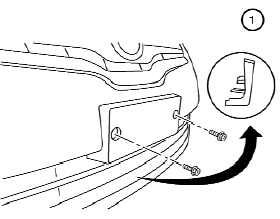
To mount the front license plate, attach the license plate bracket 1 to the plastic finisher at the location marks (small dimples) using the two 6 mm screws provided.
See also:
CD, DVD or USB with Compressed Audio Files (models with Navigation System)
The file types supported by this system are MP3,
WMA, AAC/M4A and ATRAC3.
Explanation of terms:
- MP3 MP3 is short for Moving Pictures
Experts Group Audio Layer 3. MP3 is the
most well known c ...
Interface system for iPod® operation
Interface system for iPod® operation
Connecting iPod®:
The iPod® outlet connector is located in the
center console. Connect the cable 1 as
illustrated, and then connect the other end of
t ...
Seat belts
The seat belts can be cleaned by wiping them
with a sponge dampened in a mild soap
solution. Allow the belts to dry completely in
the shade before using them.
See “Seat belts” in the “1. ...