
Console box
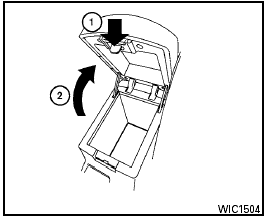
Console box
To open the console box, press in on the lever 1 and raise the lid 2 .
To close, push the lid down until the lock latches.
See also:
How to adjust the screen
To adjust the Display ON/OFF, Brightness, Tint,
Color, Contrast and Black Level of the RearView
Monitor, push the SETTING button with the
RearView Monitor on and select the Display
key. Select ...
Tire pressure monitoring system (TPMS)
Each tire, including the spare (if provided),
should be checked monthly when cold and inflated
to the inflation pressure recommended by
the vehicle manufacturer on the vehicle placard
or tire ...
INTERIOR
The Murano's interior caters to families, with everything within reach and
well-placed.
In the front row, the seats were comfortable and heated in my test car. The
fabric upholstery looked somew ...