
How to use remote keyless entry system
Nissan Rogue / Nissan Rogue Owners Manual / Pre-driving checks and adjustments / Remote keyless entry system (if so equipped) / How to use remote keyless entry system
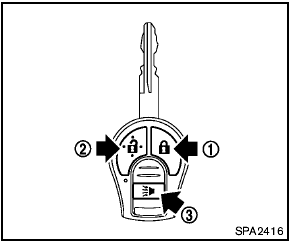
How to use remote keyless entry system
1 LOCK button 
2 UNLOCK button 
3 PANIC button 
See also:
Center armrest (if so equipped)
Pull the armrest down until it is horizontal. ...
Flat towing
Towing your vehicle with all four wheels on the
ground is sometimes called flat towing. This
method is sometimes used when towing a vehicle
behind a recreational vehicle, such as a motor
home. ...
Engine compartment check locations
QR25DE engine
1. Power steering fluid reservoir
2. Engine oil filler cap
3. Brake fluid reservoir/Clutch fluid
reservoir (M/T model)
4. Air cleaner
5. Fuse block
6. Battery
7. Fuse/Fusible l ...